HP EliteBook 10th Gen vs ProBook 640 G4:Full Real-World Performance, Battery & Zoom Test (2026)
Tested and written based on first-hand ownership and real-world usage in 2026.
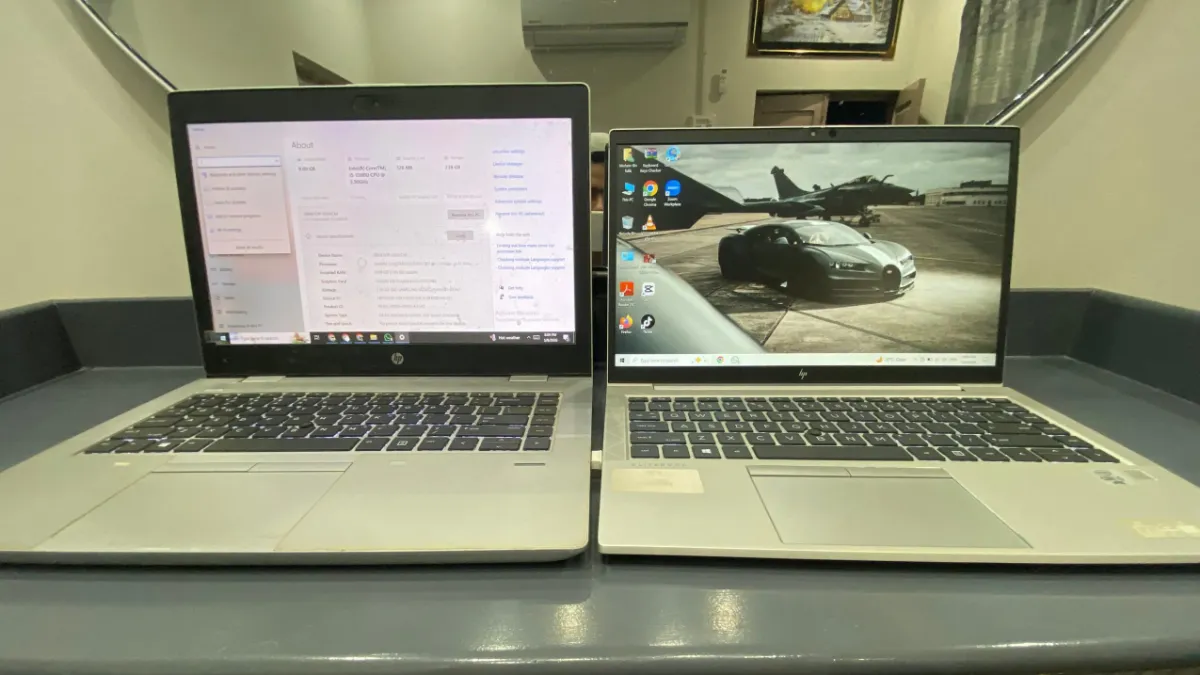
About the Devices: Exact Hardware Specifications
Before diving into the performance tests, it is important to know exactly what hardware we are dealing with. When buying used tech, specifications can vary wildly even within the same model name. Here are the exact system specifications pulled directly from Windows on the two machines we purchased for this test.
| Hardware Specification | HP ProBook 640 G4 | HP EliteBook 840 G7 |
|---|---|---|
| Processor (CPU) | Intel Core i5-7200U @ 2.50GHz (7th Gen Dual-Core) | Intel Core i5-10310U @ 1.70GHz (10th Gen Quad-Core) |
| Installed RAM | 8.00 GB (7.85 GB usable) | 8.00 GB (7.34 GB usable) |
| Storage (SSD) | 256GB Samsung SSD (MZVLQ256HAJD-000H1) |
256GB Western Digital SSD (WDC PC SN530 SDBPNPZ) |
| Graphics (GPU) | Intel HD Graphics 620 | Intel UHD Graphics |
| System Architecture | 64-bit operating system, x64-based processor | 64-bit operating system, x64-based processor |
| Display / Touch | Standard Non-Touch Display | Standard Non-Touch Display |
1. The 2026 Modern Meeting Test: Zoom Performance
If you are buying a used laptop for remote work or online classes, standard benchmark scores don’t tell the whole story. We put both the HP EliteBook (10th Gen i5) and the HP ProBook 640 G4 through a real-world test: a standard Zoom meeting with video enabled. The results were night and day.

Visual Proof: High CPU bottlenecking on the 8th Gen architecture during HD video conferencing.
During our live testing, we monitored the system resources using Windows Task Manager to see exactly how hard these machines had to work. Here is what we found:
| Performance Metric | HP ProBook 640 G4 (7th Gen i5-7200U | HP EliteBook (i5-10310U 10th Gen) |
|---|---|---|
| CPU Utilization | 100% (Bottlenecked) | 23% (Smooth) |
| RAM Usage (8GB Total) | 87% (6.9 GB used) | 88% (6.4 GB used) |
| GPU Utilization | 23% | 27% |
| User Experience | Noticeable lag, struggling under load | Zero lag, crisp video processing |
Our Verdict on Video Conferencing
The HP EliteBook is the clear winner here. Because modern video conferencing apps use a surprising amount of processing power (especially if you use background blur or filters), the older processor in the ProBook 640 G4 simply cannot keep up. It maxed out at 100% CPU usage, resulting in a sluggish experience.
The EliteBook’s 10th Gen i5-10310U handled the same meeting at a breezy 23% CPU load. Furthermore, the built-in webcam on the EliteBook provided a significantly sharper, better-lit image compared to the washed-out sensor on the older ProBook.
2. The Wake-from-Sleep Test: Is the $60 Upgrade Worth It?
In 2026, we expect our devices to be ready the second we open the lid. To test this, we put both laptops to sleep and timed exactly how long it took from lifting the screen to seeing a fully usable Windows desktop. This test revealed one of the most frustrating differences between the two machines.
HP EliteBook (10th Gen i5)
0.8 Seconds
Experience: Instantaneous. It wakes up in the blink of an eye, offering a smartphone-like instant on experience.
HP ProBook 640 G4
4.6 Seconds
Experience: Highly disappointing. You are left staring at a blank screen waiting for the hardware to catch up.
The $60 Question
Here is where this benchmark becomes critical for anyone buying a used laptop right now. Currently, the price difference between these two specific models on the used market is only about $60.
Why is the speed gap so large? The 10th Gen Intel processor inside the EliteBook features improved “Modern Standby” power states and communicates faster with the internal NVMe SSD. The older 8th Gen ProBook simply wakes up much clunkier.
- ProBook Con: That 4.6-second delay happens every single time you open your laptop. It breaks your workflow, feels sluggish, and constantly reminds you that you are using older tech.
- EliteBook Pro: The 0.8-second wake time makes the laptop feel brand new and premium, matching the speed of much more expensive 2026 laptops.
Copilot AI Features on Legacy Hardware: 15-Day ProBook 640 G4 Torture Test
3. The 2026 Battery Reality Check: Don’t Trust the “Health” Percentage
Battery life is the single biggest gamble when buying a used laptop. Manufacturer claims from 2018 or 2020 are completely irrelevant today. To get the real story, we bypassed Windows’ basic battery icon and ran a hardcore diagnostic using the powercfg /batteryreport command prompt on both machines.

Raw Data: The perfect 100% health report on the ProBook masked its lower capacity limits.
We didn’t just run a quick 10-minute benchmark. We actively used both laptops side-by-side over a multi-day testing period to capture real-world drain. The results completely shattered our expectations and revealed a critical lesson for anyone buying used tech: Battery efficiency matters more than battery health.
| Battery Metric (Command Prompt Data) | HP ProBook 640 G4 (8th Gen) | HP EliteBook 840 G7 (10th Gen) |
|---|---|---|
| Active Testing Period | May 5 – May 8, 2026 | May 5 – May 8, 2026 |
| Original Design Capacity | 38,521 mWh | 53,015 mWh (Physically larger) |
| Current Max Capacity | 38,521 mWh | 42,827 mWh |
| Current Battery Health | 100% (Likely an aftermarket replacement) | 80.7% (Expected degradation) |
| Real-World Active Life Estimate | ~3.5 Hours | ~5 to 6 Hours |
The Perfect Health Illusion
If you look closely at our diagnostic table, the ProBook 640 G4 claims to have a perfect battery with 0% degradation. However, because it has a physically smaller battery (38.5 Wh) and is running an older, highly inefficient 8th Gen processor, it burns through that power rapidly. Over our 3-day tracking period, active use drained it completely in just about 3.5 hours.
On the other hand, our EliteBook is a genuine used machine. Its battery has degraded by about 19% since it was first installed. But look at the math: 80% of a massive 53 Wh battery is still more raw power than 100% of the ProBook’s tiny battery.
4. Real-World Pricing & The Hidden Costs of Older Tech
We actually went out and purchased both of these laptops locally from City Laptop in Rahim Yar Khan. We are listing our exact out-of-pocket costs in USD so international buyers can easily compare the value.
| Purchase Details | HP ProBook 640 G4 (8th Gen) | HP EliteBook 840 G7 (10th Gen) |
|---|---|---|
| Base Laptop Price | $183.01 | $235.05 |
| Store Battery Warranty | 8 Days | 15 Days |
| Cosmetic Fixes/Accessories | +$3.41 (Wrap/Protectors) | $0.00 (Ready to use) |
| Total Cost | $186.42 | $235.05 |
5. The Typing Test: Feel, Speed, and Night-Shift Functionality
To test the tactile feel, we typed out a complete CV summary on each. This highlighted a massive difference in typing fatigue, but also revealed a surprising victory for the older ProBook.
HP EliteBook (10th Gen)
Typing Feel: Feather-Light & Fast
Incredibly smooth. Keys register with almost zero resistance—practically actuating under just the resting weight of your fingers.
HP ProBook 640 G4
Typing Feel: Deep & Heavy
Keys have deep travel and require more force. Over long sessions, this can lead to noticeable finger fatigue.
About the Author: I’m Shahzaman Bin Aziz, a software developer who often works with budget and used business laptops. Over time, I started testing and comparing devices in real working conditions because specifications alone don’t reflect real-world performance. This article is based on my personal experience using both laptops side by side during actual daily tasks in 2026.

[…] Related Comparison: HP EliteBook 10th Gen vs. ProBook 640 G4: Full Zoom & Battery Test […]